
Find answers about implementation, virtual try-on, product visualization, integrations, analytics, and account support.
Injecting Tangiblee as the Embed
Embed Overview
Tangiblee Embed allows customers to experience products with our dynamic visualization solutions — all without clicking a single link.
Being embedded directly on a page allows us to provide users with the full range of Tangiblee capabilities — each widget element is now reflected on a PDP and loaded asynchronously alongside other webpage elements.
What’s Different With Embed?
- On Model, Virtual Try-On, Compare, and other core Tangiblee experiences are embedded on your page and ready to be leveraged;
- Interactive components available upon hover;
- Choose from single tile, multi-tile, and carousel layouts:
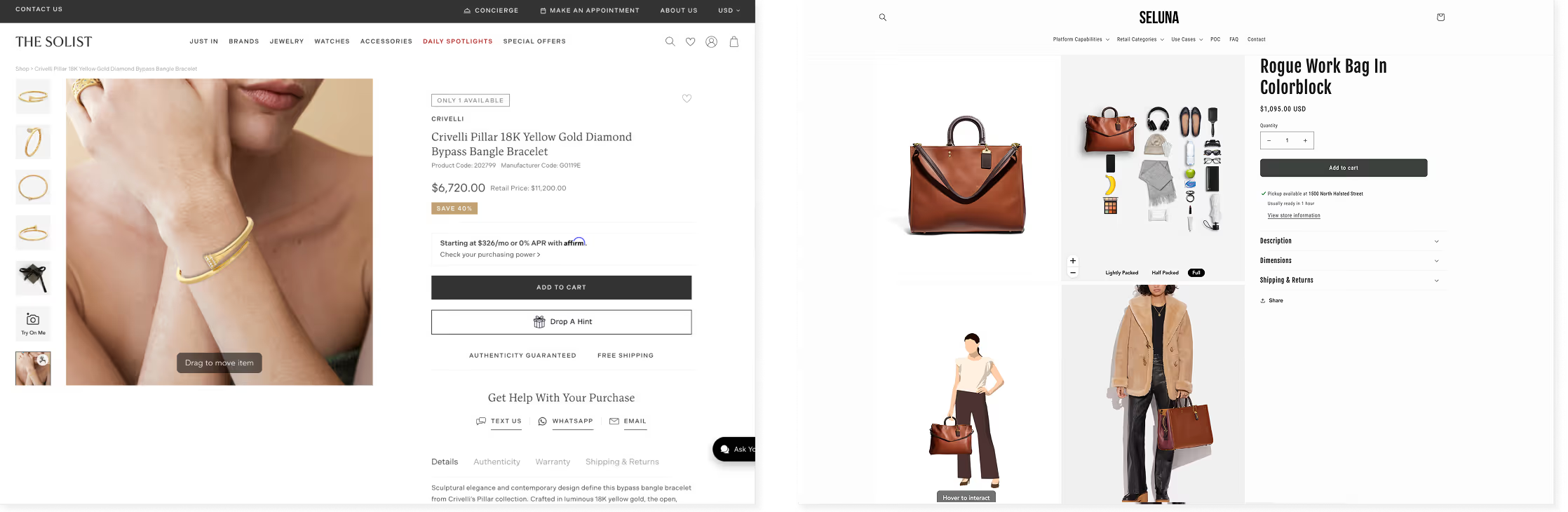
- Available for PDP and standalone pages.
Integration Process
At Tangiblee, we understand that every website is unique and integrating our platform seamlessly into your PDPs can vary depending on your specific layout. In this article, we'll explore the different integration methods supported by Tangiblee for various PDP structures.
1. Preliminary Assessment of the PDP Structure
Before diving into integration, it's crucial to evaluate your PDP structure: some pages may not have elements like Carousels or Tiles, which simplifies the integration process. For these cases, we may employ DIV element to create the necessary container on the web page for Embed. Other integration cases require additional research efforts from our team.
Keep in mind
- Embed is configurable only within the Integration script version 5.0. If you are currently using 3.1, please contact your Tangiblee Account Manager for receiving the new script.
- We have noticed that using up to 5 iFrames on the page ensures its optimal performance.
- There are certain modes that should always be injected as a Stand-Alone variation (read more about it in the Stand-Alone section below).
2. Determining the Injection Method
Overview of Injecting Options
There are three available methods for embedding Tangiblee:
- Overwriting the existing client’s tile or thumb with the embedded experience.
- This method is both the most stable one since we overwrite content already present within the tile or thumbnail.
- The total number of slides, tiles, or thumbnails must be sufficient for overwriting, typically ranging from 4 to 6, depending on the overall number of modes and thumbnails.
- Injection into a dedicated client-created Placeholder. This method is typically used when other methods listed above are not feasible and is the only option for Stand-Alone integration.Once the container is created on a page, Tangiblee will be able to inject needed experiences into it.
- Injection from Tangiblee's side. Tangiblee team will duplicate the already existing tile or thumb on the page and then inject the experience into this element.
What’s required for each Injecting Option?
Overwriting
Specify which thumb(s)/slide(s), tile(s) can be used to embed content into and confirm the number of them with your Tangiblee Account Manager based on the mockup prepared.
Injection into a client-created Placeholder
- Create a container with a unique class name/ID (for example,
id="tangiblee-wrapper”). This will allow us to easily identify the placement for the iFrame integration.- If you’d like to have Jewelry Stacking, Look or Charm Builder, WFI Premium, or Virtual Room Design on your page, please be aware that it can be injected as a stand-alone variation only.
- Specify styles as
display: none;without!importantrule in CSS. This is required for the container to be hidden in case the product is not approved in the system. We’ll remove the style to show the container with content once the product is approved. - To ensure the smooth operation of Embed on the page, it's important to keep the ID name of a container consistent. If a name change is planned, please inform the Tangiblee team in advance.
Injection from Tangiblee's Side
- Confirm the place where Tangiblee should be injected (for example: between thumb/slide/thumb 1 and 2, or last in the carousel.
- [Carousel layout only] For the accurate integration into the carousel and efficient widget functioning, please provide 2 API methods to insert slide into the main and corresponding thumbnail images at a specified position and the ability to remove it.
PDP layout with a Carousel
Tangiblee supports the following third-party carousels: Slick Slider, Fotorama and Swiper. If you are using another third-party or in-house carousel solution, Tangiblee can still provide support as long as the requirements below are met. For more information and guidance, please contact your Tangiblee Account Manager.
Requirements for integrating with the in-house Carousel
Provide API methods for Carousel control that should include:
- The ability to insert slide for main and corresponding thumbnail images at a specified position and remove it;
- We’ll need to subscribe to
onSlideChangedevent to identify whenever a slide change occurs in the carousel. This is crucial for keeping our widget in sync with the carousel's current state and for the correct slider functioning.
[[warning]]Embed is configurable only within the Integration script version 5.0. If you are currently using 3.1, please contact your Tangiblee Account Manager to receive the new script.[[warning]]
embedded widget, PDP 埋め込み, ギャラリー 連携, onsite 実装, media area 配置, technical 設定
CTAボタンなしでTangibleeエクスペリエンスを商品ページレイアウトに直接埋め込む方法。埋め込みコードスニペット、配置コンテナ、PDP統合手順。