
How Virtual Room Design Can Reduce Your Returns
Furniture is one of those products that historically hasn't translated very well to online sales.
It's not difficult to understand why, either. When you buy a piece of furniture at a brick-and-mortar retailer, you can see exactly how it looks and feels. You can look at things like size, style and color to ensure that it not only matches your other furniture, but also that it will actually fit in your home.
Online retail…doesn't really allow you to do any of that. Not easily, anyway. The end result is a return process that's frustrating, time-consuming, and overly expensive for everyone involved.
First, the customer needs to find a way to move the offending product out of their space. Once they do that, they need to coordinate the actual return. That typically means either waiting for a delivery person to show up or figuring out some way to haul it to the nearest mail carrier.
Things aren't much better for you as a retailer, either. Unless you want the black mark of multiple bad reviews, you'll need to take care of the return's shipping and handling fees. All the while, you're left with one fewer product in your inventory, and there's no guarantee you'll even be able to sell the item again once you receive it back.
But what exactly can you do to avoid this process? After all, not everyone will have the wherewithal to measure their space and compare it to your furniture's dimensions. Moreover, even the best product photography only gets you so far.
Tangiblee can help, courtesy of our Virtual Room Design feature.
Visualization to boost customer confidence
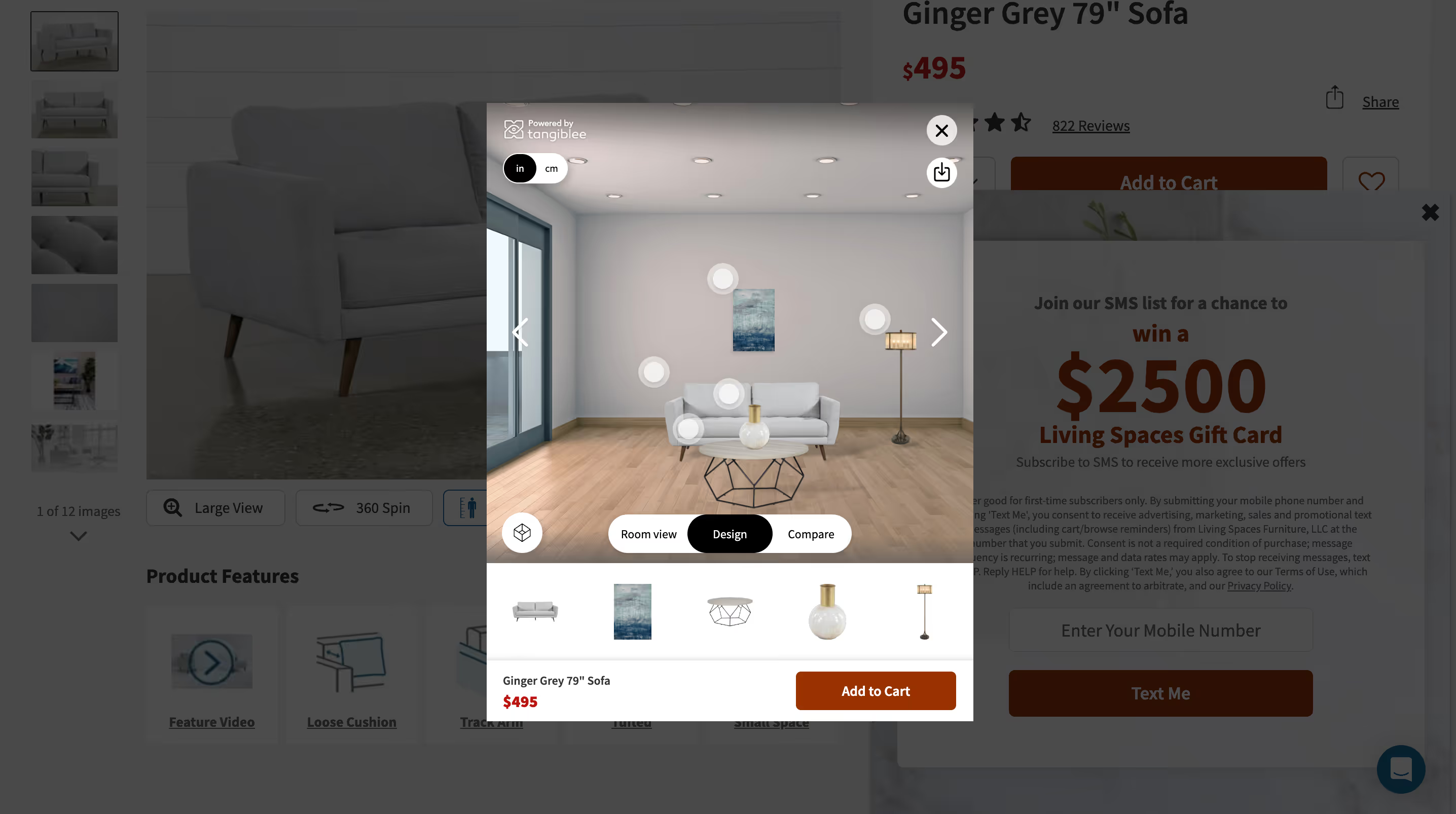
Available on both desktop and mobile devices, Virtual Room Design allows users to mix and match products in a fully customizable virtual space. Once a customer clicks the "Design" button, they'll be presented with a virtual room that contains several different hotspots. Clicking on one of these hotspots will display a list of custom recommendations from your product catalog.
Don't worry if you don't have the time to handle those recommendations manually, either. Tangiblee seamlessly integrates with your store's existing recommendation logic to generate recommended items for each area of the room. This also has the potential to increase revenue per visitor — a customer might, for example, realize that a chair they're thinking of purchasing would look out of place unless they also grab an end table and a lamp.
The shopper can continue swapping out products and trying new combinations for as long as they like. Once they're happy with how everything looks, they can then add either a single product or all the products in the room to their cart with just a few clicks. Shoppers can also swap between several different backgrounds and room styles.
This not only allows them to look for a room that matches their own space, but can also help a customer who's redecorating come up with some new design ideas.
Best of all, this feature is incredibly light on resources. All you need in order to incorporate it into your website is a single line of code. Tangiblee's platform takes care of the rest.
Experience the Virtual Room Design difference and try Tangiblee today
Whether you’re looking to allow shoppers to create their perfect space or want to help them visualize your catalog in their own home, features like Virtual Room Design achieve something product photography on its own never could.
They increase customer confidence and reduce the likelihood of returns. Plus, if you maintain a brick-and-mortar store, Tangiblee can even act as a resource for in-person shoppers to plan their purchases.
Ready to go beyond static product pages and create a compelling customer experience? Schedule a 15-minute live demo now and see Tangiblee in action.