
Innovation Spotlight: Size and Color Selectors
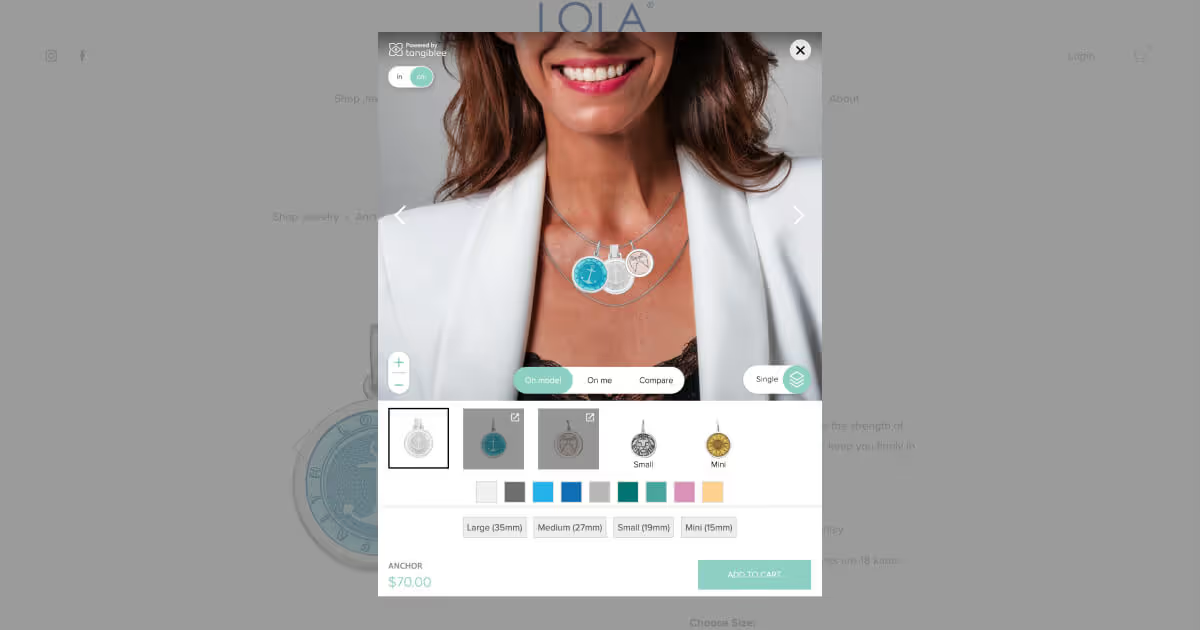
The goal of any Virtual Try-On (VTO) or immersive shopping experience is to create a seamless buying journey, much like your customers’ in-store experience. The fewer number of clicks to experiment with different color and size variations, the better.
For this reason, we are excited to announce that customers no longer have to exit Tangiblee’s platform in order to visualize a product in a different size or color. With the new Size and Color Selector, customers can stylize items to curate their perfect look without extra steps that might divert them from finishing their purchase. Customers can open Tangiblee’s platform and interact with the product with on-model imagery or on themselves with Virtual Try-On (VTO). For stackable items, customers can create their stack and change the size and color of each particular item within that stack.
For example, Lola provides this feature on their stackable pendant necklace. Multiple pendants can be stacked to create the perfect look and customers can manipulate the size and color of each of the pendants all within the platform.

If this sounds like a feature your e-commerce website needs, head here to schedule a free virtual demo. To stay up-to-date on our latest innovations follow us on LinkedIn.
This feature allows customers to engage with a product, change the color, change the size, and add the product to their cart all within the Tangiblee platform. This reduces friction within the buying process by limiting the number of clicks required to get to check out.
Customers can open Tangiblee’s platform and interact with the product with on-model imagery or on themselves with Virtual Try-On (VTO). With the Size and Color Selector feature, customers can now manipulate these factors within the solution to curate their perfect look. For stackable items, customers can create their stack and change the size and color of each particular item within that stack.