Skip to main content

Find answers about implementation, virtual try-on, product visualization, integrations, analytics, and account support.

Añadir un selector de tamaño de anillo personalizado

Last Updated:
May 22, 2026

Paso 1:

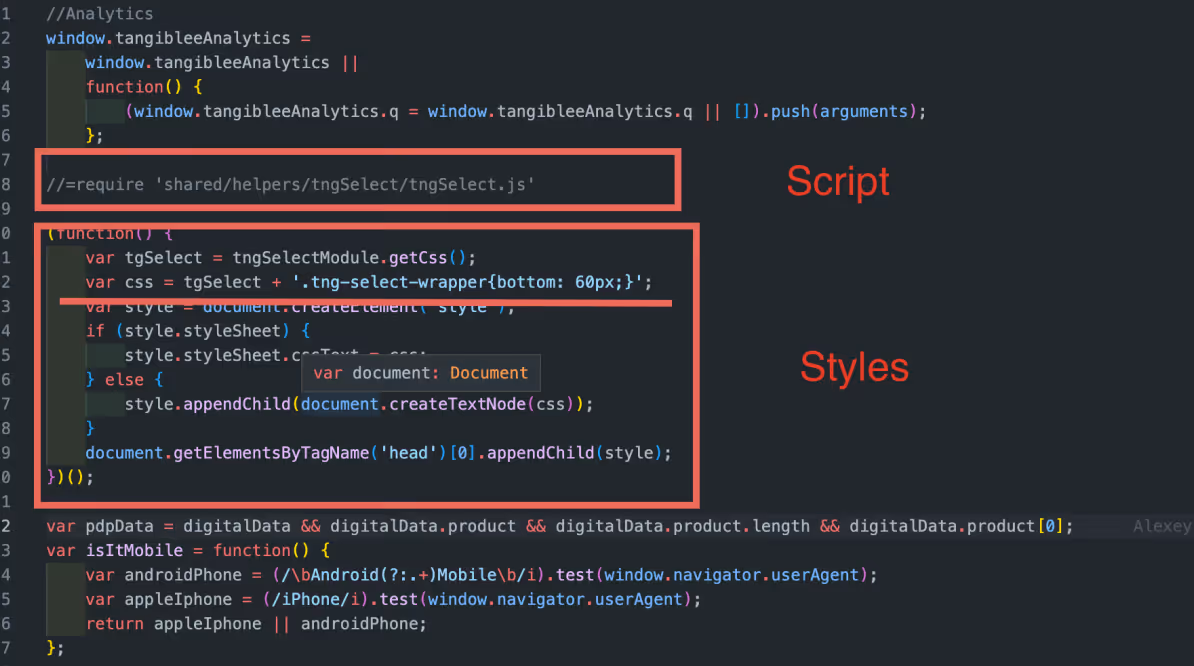
Agregar el script tngSelect.js and the estilos al tangiblee-mapper.js.


//=require 'shared/helpers/tngSelect/tngSelect.js'
(function() {
var tgcarousel = tngCarouselModule.getCss();
var tgSelect = tngSelectModule.getCss();
var css = tgcarousel + tgSelect + '<< style.css >>';
var style = document.createElement('style');
if (style.styleSheet) {
style.styleSheet.cssText = css;
} else {
style.appendChild(document.createTextNode(css));
}
document.getElementsByTagName('head')[0].appendChild(style);
})();

Paso 2:

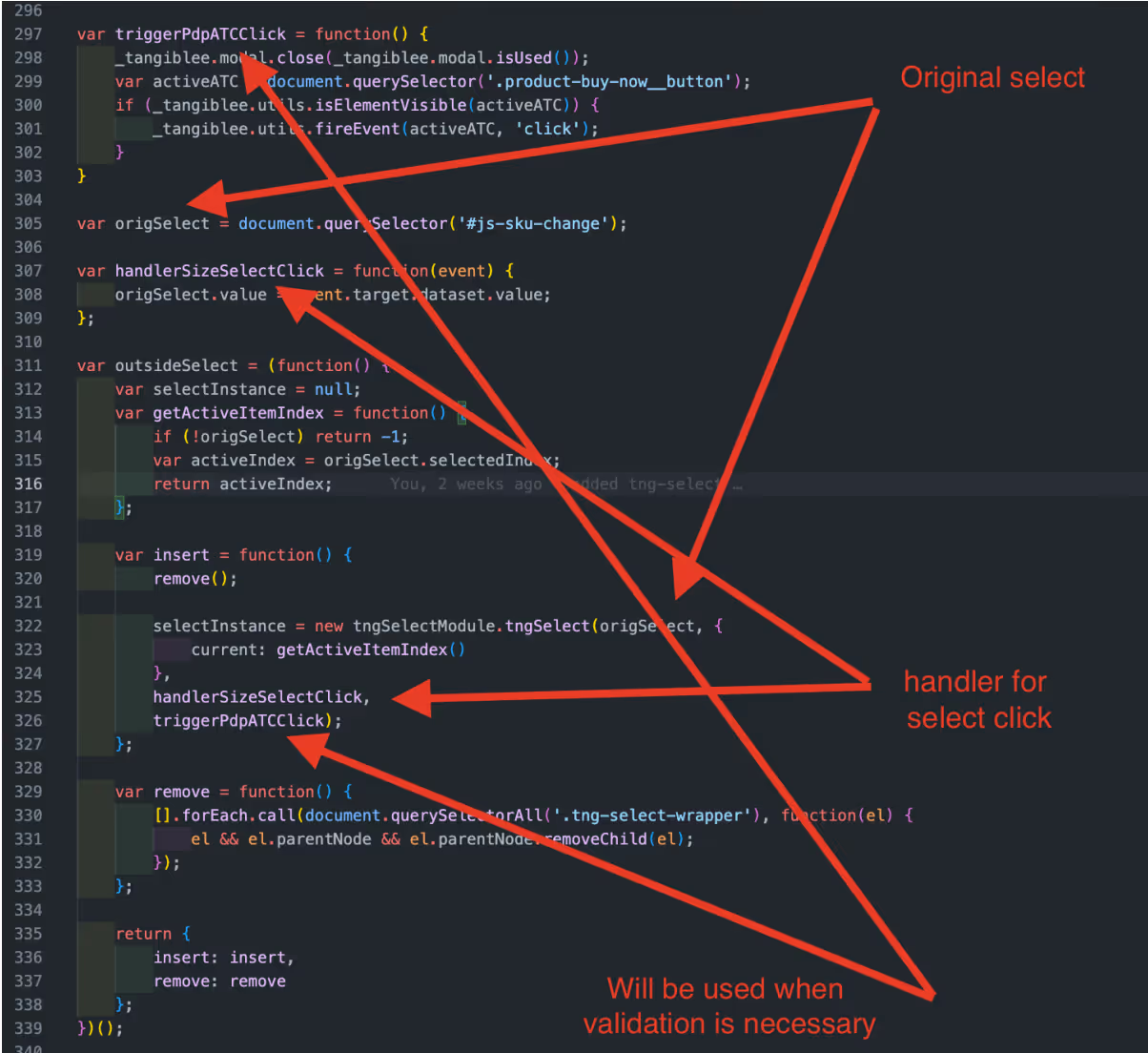
Agregar nuestra selección personalizada al mapeador.

Per example:


var origSelect = document.querySelector('#js-sku-change');
var handlerSizeSelectClick = function(event) {
origSelect.value = event.target.dataset.value;
};
var outsideSelect = (function() {
var selectInstance = null;
var getActiveItemIndex = function() {
if (!origSelect) return -1;
var activeIndex = origSelect.selectedIndex;
return activeIndex;
};

var insert = function() {
remove();
selectInstance = new tngSelectModule.tngSelect(origSelect, {
current: getActiveItemIndex()
},
handlerSizeSelectClick,
triggerPdpATCClick);
};
var remove = function() {
[].forEach.call(document.querySelectorAll('.tng-select-wrapper'), function(el) {
el && el.parentNode && el.parentNode.removeChild(el);
});
};
return {
insert: insert,
remove: remove
};
})();

Paso 3:

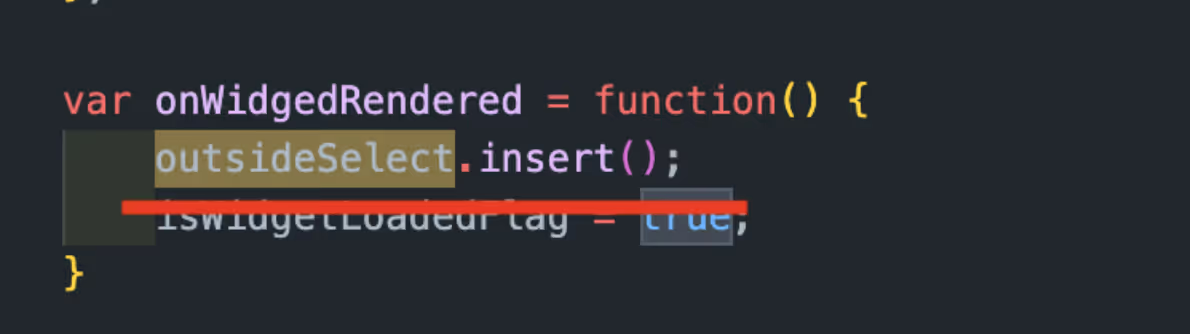
La selección se añadiría cuando un usuario hiciera clic en una CTA y abriera el widget.


var onWidgedRendered = function() {
outsideSelect.insert();
}

Paso 4:

Para insertar el selector, necesitaríamos agregar un espacio libre en el pie de página del widget donde deberíamos agregar las clases externas (tg-size-selector/tg-color-selector) en la integración. También deberíamos añadir los siguientes estilos en el widget (el archivo css del cliente).


/*===COLOR AND SIZE SELECTORS===*/
.ux4:not(.from-qr).tg-color-selector .header,
.ux4:not(.from-qr).tg-size-selector .header {
max-height: 128px; /*for animation*/
}
.ux4:not(.from-qr).tg-color-selector.tg-size-selector .header {
max-height: 182px; /*for animation*/
}
.ux4:not(.from-qr).tg-color-selector .header--hidden,
.ux4:not(.from-qr).tg-size-selector .header--hidden,
.ux4:not(.from-qr).tg-color-selector.tg-size-selector .header--hidden {
max-height: 0; /*for animation*/
}
.ux4:not(.from-qr).tg-color-selector .header__text-container,
.ux4:not(.from-qr).tg-size-selector .header__text-container {
padding-top: 74px;
margin-bottom: 10px;
}
.ux4:not(.from-qr).tg-color-selector.tg-size-selector .header__text-container {
margin-bottom: 0;
padding-top: 110px;
}
.ux4:not(.from-qr).tg-color-selector .minicart__add-to-cart,
.ux4:not(.from-qr).tg-size-selector .minicart__add-to-cart {
margin-top: auto;
}
.ux4:not(.from-qr).tg-color-selector .header::before,
.ux4:not(.from-qr).tg-size-selector .header::before {
content: '';
position: absolute;
left: 0;
display: block;
width: 100%;
height: 6px;
box-shadow: inset 0 -6px 6px -6px rgb(0 0 0 / 20%);
box-sizing: border-box;
}
.ux4:not(.from-qr).tg-color-selector .header::before {
bottom: 70px;
}
.ux4:not(.from-qr).tg-size-selector .header::before {
bottom: 126px;
}
.ux4:not(.from-qr).tg-color-selector .control-panel-ux4__wrapper,
.ux4:not(.from-qr).tg-size-selector .control-panel-ux4__wrapper{
box-shadow: none;
}
@media screen and (width: 480px) {
.ux4:not(.from-qr).tg-color-selector .qr-block,
.ux4:not(.from-qr).tg-size-selector .qr-block {
padding-top: 55px;
}
.ux4:not(.from-qr).tg-size-selector.tg-color-selector .qr-block {
padding-top: 15px;
}
}
@media (min-height: 799px) {
.ux4:not(.from-qr).tg-size-selector.tg-color-selector .qr-block {
padding-top: 195px;
}
}

/*===COLOR SELECTOR===*/
.ux4:not(.from-qr).tg-color-selector .header {
max-height: 126px; /*for animation*/
}
.ux4:not(.from-qr).tg-color-selector .header--hidden {
max-height: 0; /*for animation*/
}
.ux4:not(.from-qr).tg-color-selector .header__text-container {
padding-top: 74px;
margin-bottom: 10px;
}
.ux4:not(.from-qr).tg-color-selector .minicart__add-to-cart {
margin-top: auto;
}
.ux4:not(.from-qr).tg-color-selector .header::before {
content: '';
position: absolute;
left: 0;
display: block;
width: 100%;
height: 6px;
box-shadow: inset 0 -6px 6px -6px rgb(0 0 0 / 20%);
box-sizing: border-box;
}
.ux4:not(.from-qr).tg-color-selector .header::before {
bottom: 70px;
}
.ux4:not(.from-qr).tg-color-selector .control-panel-ux4__wrapper {
box-shadow: none;
}
@media screen and (width: 480px) {
.ux4:not(.from-qr).tg-color-selector .qr-block {
padding-top: 55px;
}
}

/*===SIZE SELECTOR===*/
.ux4:not(.from-qr).tg-size-selector .header {
max-height: 128px; /*for animation*/
}
.ux4:not(.from-qr).tg-size-selector .header--hidden {
max-height: 0; /*for animation*/
}
.ux4:not(.from-qr).tg-size-selector .header__text-container {
padding-top: 74px;
margin-bottom: 10px;
}
.ux4:not(.from-qr).tg-size-selector .minicart__add-to-cart {
margin-top: auto;
}
.ux4:not(.from-qr).tg-size-selector .header::before {
content: '';
position: absolute;
left: 0;
display: block;
width: 100%;
height: 6px;
box-shadow: inset 0 -6px 6px -6px rgb(0 0 0 / 20%);
box-sizing: border-box;
}
.ux4:not(.from-qr).tg-size-selector .header::before {
bottom: 126px;
}
.ux4:not(.from-qr).tg-size-selector .control-panel-ux4__wrapper{
box-shadow: none;
}
@media screen and (width: 480px) {
.ux4:not(.from-qr).tg-size-selector .qr-block {
padding-top: 55px;
}
}

anillo talla selector, personalizadas selector, talla dropdown, joyería sizing, feature configuración, onsite UX

Añade un selector de talla de anillos personalizado al widget de Tangiblee. Incluye opciones recomendadas, buenas prácticas de UX y pasos de configuración para una experiencia consistente.

Related Resources