Ajouter un sélecteur de taille de bague personnalisé
Étape 1 :
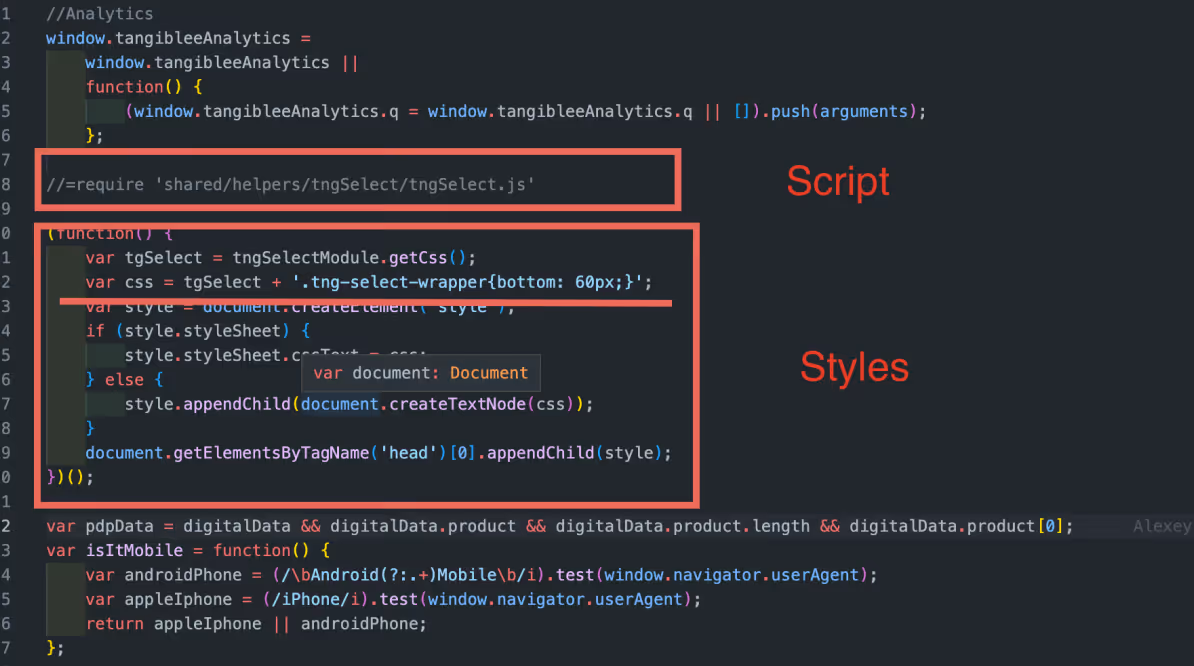
Ajout du script tngSelect.js et des styles au fichier tangiblee-mapper.js.

//=require 'shared/helpers/tngSelect/tngSelect.js'
(function() {
var tgcarousel = tngCarouselModule.getCss();
var tgSelect = tngSelectModule.getCss();
var css = tgcarousel + tgSelect + '<< style.css >>';
var style = document.createElement('style');
if (style.styleSheet) {
style.styleSheet.cssText = css;
} else {
style.appendChild(document.createTextNode(css));
}
document.getElementsByTagName('head')[0].appendChild(style);
})();
Étape 2 :
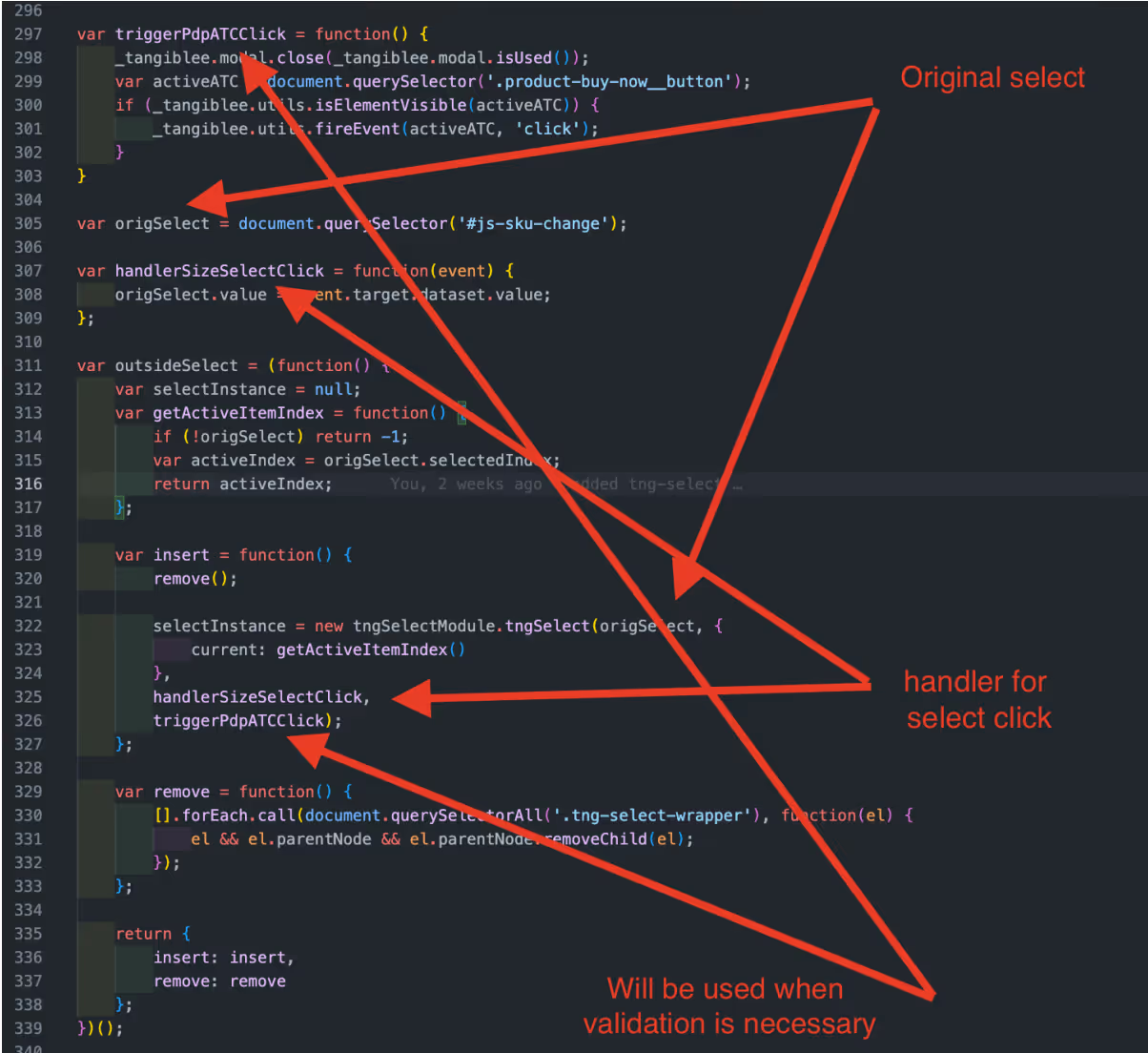
Ajout de notre sélection personnalisée au mappeur.
Par exemple :

var origSelect = document.querySelector('#js-sku-change');
var handlerSizeSelectClick = function(event) {
origSelect.value = event.target.dataset.value;
};
var outsideSelect = (function() {
var selectInstance = null;
var getActiveItemIndex = function() {
if (!origSelect) return -1;
var activeIndex = origSelect.selectedIndex;
return activeIndex;
};
var insert = function() {
remove();
selectInstance = new tngSelectModule.tngSelect(origSelect, {
current: getActiveItemIndex()
},
handlerSizeSelectClick,
triggerPdpATCClick);
};
var remove = function() {
[].forEach.call(document.querySelectorAll('.tng-select-wrapper'), function(el) {
el && el.parentNode && el.parentNode.removeChild(el);
});
};
return {
insert: insert,
remove: remove
};
})();
Étape 3 :
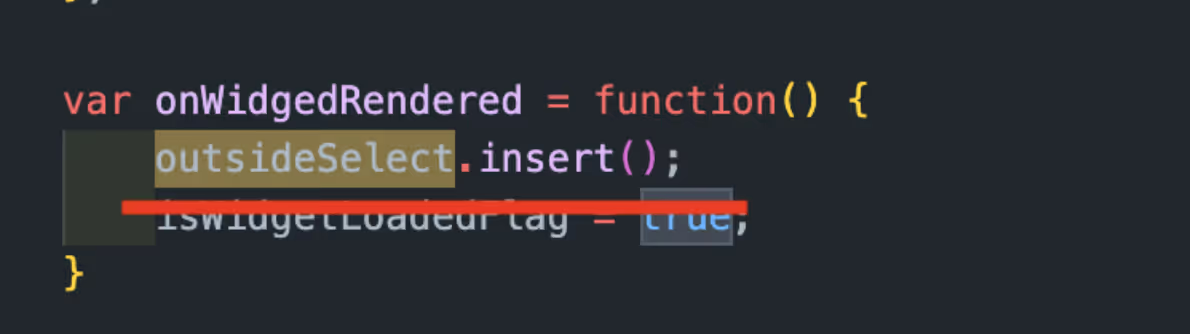
La sélection était ajoutée lorsqu'un utilisateur cliquait sur un CTA et ouvrait le widget.

var onWidgedRendered = function() {
outsideSelect.insert();
}
Étape 4 :
Pour injecter le sélecteur, il faudrait ajouter un espace libre dans le pied de page du widget où nous devrions ajouter les classes externes (tg-size-selector/tg-color-selector) en intégration. Nous devrions également ajouter les styles ci-dessous dans le widget (fichier CSS du client).
/*===COLOR AND SIZE SELECTORS===*/
.ux4:not(.from-qr).tg-color-selector .header,
.ux4:not(.from-qr).tg-size-selector .header {
max-height: 128px; /*for animation*/
}
.ux4:not(.from-qr).tg-color-selector.tg-size-selector .header {
max-height: 182px; /*for animation*/
}
.ux4:not(.from-qr).tg-color-selector .header--hidden,
.ux4:not(.from-qr).tg-size-selector .header--hidden,
.ux4:not(.from-qr).tg-color-selector.tg-size-selector .header--hidden {
max-height: 0; /*for animation*/
}
.ux4:not(.from-qr).tg-color-selector .header__text-container,
.ux4:not(.from-qr).tg-size-selector .header__text-container {
padding-top: 74px;
margin-bottom: 10px;
}
.ux4:not(.from-qr).tg-color-selector.tg-size-selector .header__text-container {
margin-bottom: 0;
padding-top: 110px;
}
.ux4:not(.from-qr).tg-color-selector .minicart__add-to-cart,
.ux4:not(.from-qr).tg-size-selector .minicart__add-to-cart {
margin-top: auto;
}
.ux4:not(.from-qr).tg-color-selector .header::before,
.ux4:not(.from-qr).tg-size-selector .header::before {
content: '';
position: absolute;
left: 0;
display: block;
width: 100%;
height: 6px;
box-shadow: inset 0 -6px 6px -6px rgb(0 0 0 / 20%);
box-sizing: border-box;
}
.ux4:not(.from-qr).tg-color-selector .header::before {
bottom: 70px;
}
.ux4:not(.from-qr).tg-size-selector .header::before {
bottom: 126px;
}
.ux4:not(.from-qr).tg-color-selector .control-panel-ux4__wrapper,
.ux4:not(.from-qr).tg-size-selector .control-panel-ux4__wrapper{
box-shadow: none;
}
@media screen and (width: 480px) {
.ux4:not(.from-qr).tg-color-selector .qr-block,
.ux4:not(.from-qr).tg-size-selector .qr-block {
padding-top: 55px;
}
.ux4:not(.from-qr).tg-size-selector.tg-color-selector .qr-block {
padding-top: 15px;
}
}
@media (min-height: 799px) {
.ux4:not(.from-qr).tg-size-selector.tg-color-selector .qr-block {
padding-top: 195px;
}
}
/*===COLOR SELECTOR===*/
.ux4:not(.from-qr).tg-color-selector .header {
max-height: 126px; /*for animation*/
}
.ux4:not(.from-qr).tg-color-selector .header--hidden {
max-height: 0; /*for animation*/
}
.ux4:not(.from-qr).tg-color-selector .header__text-container {
padding-top: 74px;
margin-bottom: 10px;
}
.ux4:not(.from-qr).tg-color-selector .minicart__add-to-cart {
margin-top: auto;
}
.ux4:not(.from-qr).tg-color-selector .header::before {
content: '';
position: absolute;
left: 0;
display: block;
width: 100%;
height: 6px;
box-shadow: inset 0 -6px 6px -6px rgb(0 0 0 / 20%);
box-sizing: border-box;
}
.ux4:not(.from-qr).tg-color-selector .header::before {
bottom: 70px;
}
.ux4:not(.from-qr).tg-color-selector .control-panel-ux4__wrapper {
box-shadow: none;
}
@media screen and (width: 480px) {
.ux4:not(.from-qr).tg-color-selector .qr-block {
padding-top: 55px;
}
}
/*===SIZE SELECTOR===*/
.ux4:not(.from-qr).tg-size-selector .header {
max-height: 128px; /*for animation*/
}
.ux4:not(.from-qr).tg-size-selector .header--hidden {
max-height: 0; /*for animation*/
}
.ux4:not(.from-qr).tg-size-selector .header__text-container {
padding-top: 74px;
margin-bottom: 10px;
}
.ux4:not(.from-qr).tg-size-selector .minicart__add-to-cart {
margin-top: auto;
}
.ux4:not(.from-qr).tg-size-selector .header::before {
content: '';
position: absolute;
left: 0;
display: block;
width: 100%;
height: 6px;
box-shadow: inset 0 -6px 6px -6px rgb(0 0 0 / 20%);
box-sizing: border-box;
}
.ux4:not(.from-qr).tg-size-selector .header::before {
bottom: 126px;
}
.ux4:not(.from-qr).tg-size-selector .control-panel-ux4__wrapper{
box-shadow: none;
}
@media screen and (width: 480px) {
.ux4:not(.from-qr).tg-size-selector .qr-block {
padding-top: 55px;
}
}