Skip to main content

Tangiblee Help Center

Find answers about implementation, virtual try-on, product visualization, integrations, analytics, and account support.

Hinzufügen eines benutzerdefinierten Ringgrößen-Selektors

Last Updated:
May 12, 2026

Schritt 1:

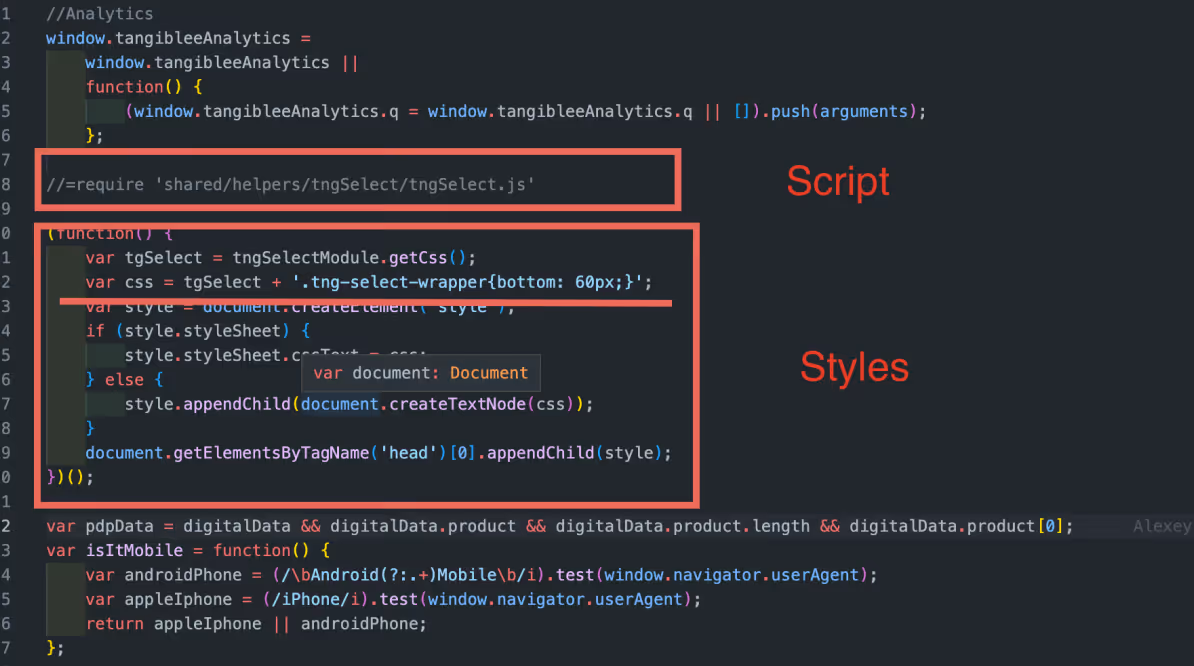
Hinzufügen des Skripts tngSelect.js und der Stile zur tangiblee-mapper.js.


//=require 'shared/helpers/tngSelect/tngSelect.js'
(function() {
var tgcarousel = tngCarouselModule.getCss();
var tgSelect = tngSelectModule.getCss();
var css = tgcarousel + tgSelect + '<< style.css >>';
var style = document.createElement('style');
if (style.styleSheet) {
style.styleSheet.cssText = css;
} else {
style.appendChild(document.createTextNode(css));
}
document.getElementsByTagName('head')[0].appendChild(style);
})();

Schritt 2:

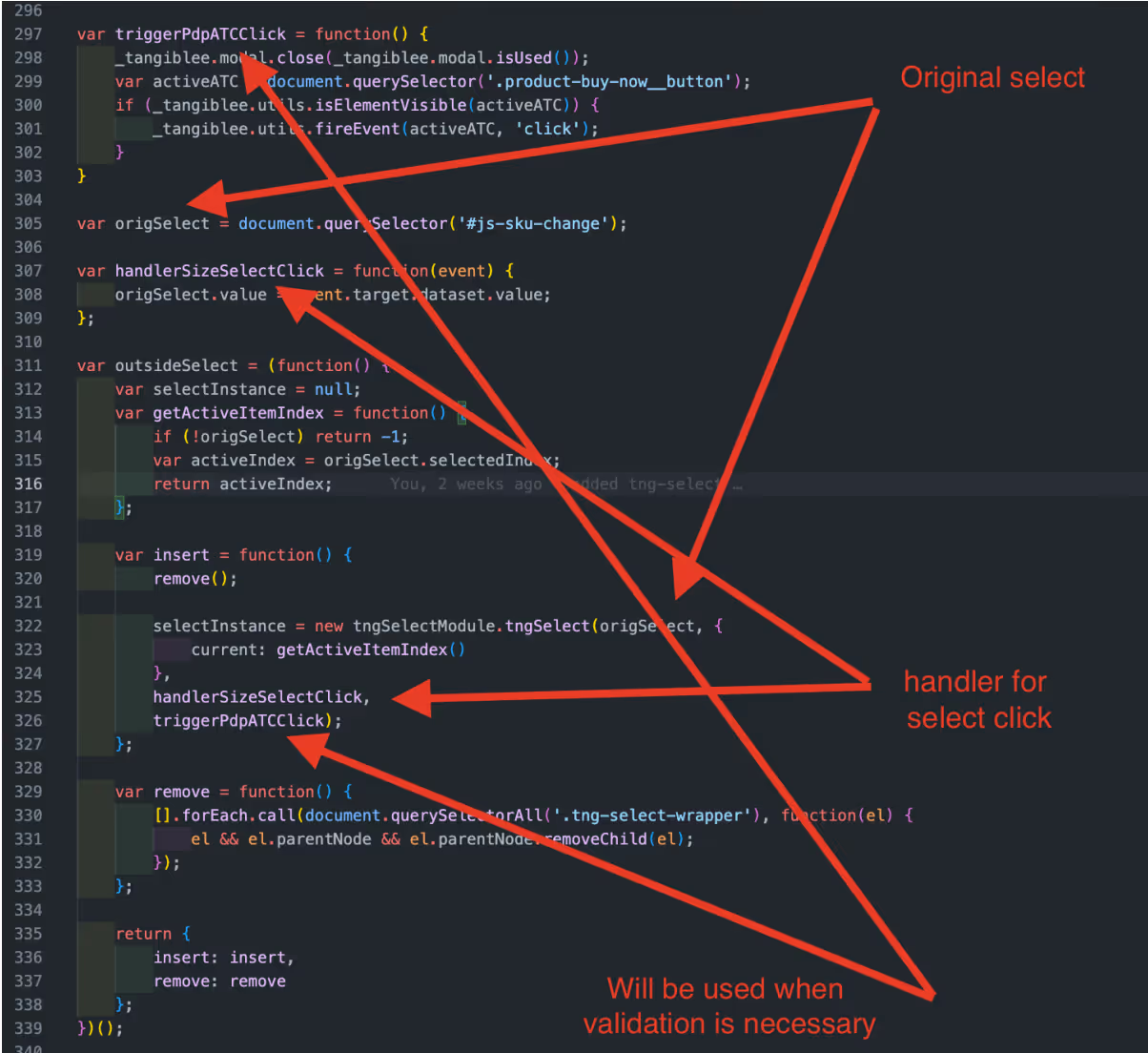
Hinzufügen unserer benutzerdefinierten Auswahl zum Mapper.

Zum Beispiel:


var origSelect = document.querySelector('#js-sku-change');
var handlerSizeSelectClick = function(event) {
origSelect.value = event.target.dataset.value;
};
var outsideSelect = (function() {
var selectInstance = null;
var getActiveItemIndex = function() {
if (!origSelect) return -1;
var activeIndex = origSelect.selectedIndex;
return activeIndex;
};

var insert = function() {
remove();
selectInstance = new tngSelectModule.tngSelect(origSelect, {
current: getActiveItemIndex()
},
handlerSizeSelectClick,
triggerPdpATCClick);
};
var remove = function() {
[].forEach.call(document.querySelectorAll('.tng-select-wrapper'), function(el) {
el && el.parentNode && el.parentNode.removeChild(el);
});
};
return {
insert: insert,
remove: remove
};
})();

Schritt 3:

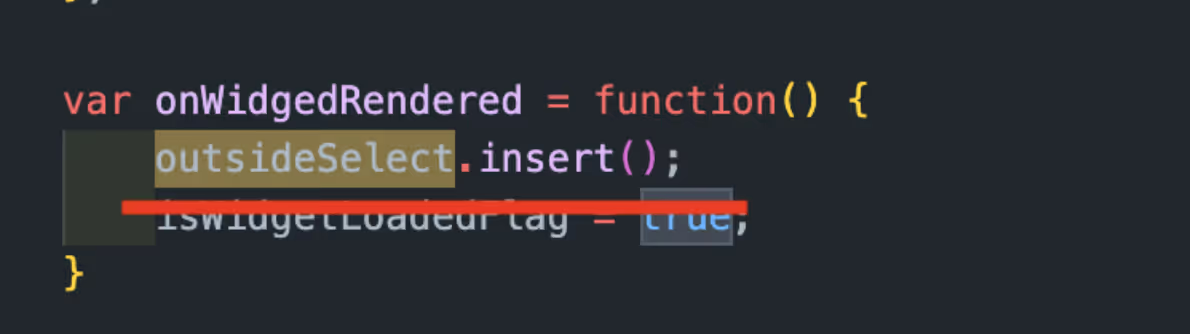
Die Auswahl würde hinzugefügt, wenn ein Benutzer auf einen CTA klickt und das Widget öffnet.


var onWidgedRendered = function() {
outsideSelect.insert();
}

Schritt 4:

Um den Selektor einzufügen, müssten wir in der Fußzeile des Widgets einen freien Platz hinzufügen, an dem wir die externen Klassen (tg-size-selector/tg-color-selector) in der Integration hinzufügen sollten. Außerdem sollten wir die folgenden Stile in das Widget (die CSS-Datei des Kunden) einfügen.


/*===COLOR AND SIZE SELECTORS===*/
.ux4:not(.from-qr).tg-color-selector .header,
.ux4:not(.from-qr).tg-size-selector .header {
max-height: 128px; /*for animation*/
}
.ux4:not(.from-qr).tg-color-selector.tg-size-selector .header {
max-height: 182px; /*for animation*/
}
.ux4:not(.from-qr).tg-color-selector .header--hidden,
.ux4:not(.from-qr).tg-size-selector .header--hidden,
.ux4:not(.from-qr).tg-color-selector.tg-size-selector .header--hidden {
max-height: 0; /*for animation*/
}
.ux4:not(.from-qr).tg-color-selector .header__text-container,
.ux4:not(.from-qr).tg-size-selector .header__text-container {
padding-top: 74px;
margin-bottom: 10px;
}
.ux4:not(.from-qr).tg-color-selector.tg-size-selector .header__text-container {
margin-bottom: 0;
padding-top: 110px;
}
.ux4:not(.from-qr).tg-color-selector .minicart__add-to-cart,
.ux4:not(.from-qr).tg-size-selector .minicart__add-to-cart {
margin-top: auto;
}
.ux4:not(.from-qr).tg-color-selector .header::before,
.ux4:not(.from-qr).tg-size-selector .header::before {
content: '';
position: absolute;
left: 0;
display: block;
width: 100%;
height: 6px;
box-shadow: inset 0 -6px 6px -6px rgb(0 0 0 / 20%);
box-sizing: border-box;
}
.ux4:not(.from-qr).tg-color-selector .header::before {
bottom: 70px;
}
.ux4:not(.from-qr).tg-size-selector .header::before {
bottom: 126px;
}
.ux4:not(.from-qr).tg-color-selector .control-panel-ux4__wrapper,
.ux4:not(.from-qr).tg-size-selector .control-panel-ux4__wrapper{
box-shadow: none;
}
@media screen and (width: 480px) {
.ux4:not(.from-qr).tg-color-selector .qr-block,
.ux4:not(.from-qr).tg-size-selector .qr-block {
padding-top: 55px;
}
.ux4:not(.from-qr).tg-size-selector.tg-color-selector .qr-block {
padding-top: 15px;
}
}
@media (min-height: 799px) {
.ux4:not(.from-qr).tg-size-selector.tg-color-selector .qr-block {
padding-top: 195px;
}
}

/*===COLOR SELECTOR===*/
.ux4:not(.from-qr).tg-color-selector .header {
max-height: 126px; /*for animation*/
}
.ux4:not(.from-qr).tg-color-selector .header--hidden {
max-height: 0; /*for animation*/
}
.ux4:not(.from-qr).tg-color-selector .header__text-container {
padding-top: 74px;
margin-bottom: 10px;
}
.ux4:not(.from-qr).tg-color-selector .minicart__add-to-cart {
margin-top: auto;
}
.ux4:not(.from-qr).tg-color-selector .header::before {
content: '';
position: absolute;
left: 0;
display: block;
width: 100%;
height: 6px;
box-shadow: inset 0 -6px 6px -6px rgb(0 0 0 / 20%);
box-sizing: border-box;
}
.ux4:not(.from-qr).tg-color-selector .header::before {
bottom: 70px;
}
.ux4:not(.from-qr).tg-color-selector .control-panel-ux4__wrapper {
box-shadow: none;
}
@media screen and (width: 480px) {
.ux4:not(.from-qr).tg-color-selector .qr-block {
padding-top: 55px;
}
}

/*===SIZE SELECTOR===*/
.ux4:not(.from-qr).tg-size-selector .header {
max-height: 128px; /*for animation*/
}
.ux4:not(.from-qr).tg-size-selector .header--hidden {
max-height: 0; /*for animation*/
}
.ux4:not(.from-qr).tg-size-selector .header__text-container {
padding-top: 74px;
margin-bottom: 10px;
}
.ux4:not(.from-qr).tg-size-selector .minicart__add-to-cart {
margin-top: auto;
}
.ux4:not(.from-qr).tg-size-selector .header::before {
content: '';
position: absolute;
left: 0;
display: block;
width: 100%;
height: 6px;
box-shadow: inset 0 -6px 6px -6px rgb(0 0 0 / 20%);
box-sizing: border-box;
}
.ux4:not(.from-qr).tg-size-selector .header::before {
bottom: 126px;
}
.ux4:not(.from-qr).tg-size-selector .control-panel-ux4__wrapper{
box-shadow: none;
}
@media screen and (width: 480px) {
.ux4:not(.from-qr).tg-size-selector .qr-block {
padding-top: 55px;
}
}

Ring Größe Selektor, kundenspezifische Selektor, Größe dropdown, Schmuck sizing, feature Konfiguration, onsite UX

Erfahren Sie, wie kundenspezifische Ring Größe Selektor Konfiguration funktioniert und wie es für das beste Einkaufserlebnis konfiguriert wird. Der Leitfaden behandelt empfohlene Optionen, UX-Aspekte und praxisnahe Details, um Engagement und Konsistenz zu verbessern.

Related Resources