
How to Sell Handbags Online Without Size-Related Returns
Why Do Customers Still Return Bags That "Seemed Perfect"?
You've done everything right.
✅ Professional photos
✅ Detailed product specs
✅ Accurate dimensions
✅ Lifestyle imagery
And yet… returns keep happening. What's really going on?
Because what customers see online doesn't always match what arrives on their doorstep.
- The bag doesn't fit their laptop - Device Fit Confusion
- It's smaller than they expected - Capacity Doubts - Abstract dimensions like “12×16×5 in” leave buyers guessing what actually fits.
- It looks oversized compared to their body - Scale Uncertainty
- Or their new carry-on bag doesn't meet airline size limits, and now it's useless for travel - Carry-On Anxiety
These aren't product flaws. They're expectation mismatches — and they're preventable with the right tools.
1. Sleeve Fit — Know Instantly If Their Device Will Fit
Tangiblee’s Sleeve Fit plugs into your product feed and taps a database of thousands of real devices. Shoppers simply select their make and model to get an instant “Snug Fit,” “Loose Fit,” or “Doesn’t Fit” verdict—no measuring tape needed.
Why it works:
- No measuring or guesswork
- Covers thousands of devices
- Works across handbags, backpacks, and tech bags
- Requires no photography — just data

Most brands see a 12% lift in add-to-cart clicks as customers linger longer on the product page exploring compatibility. Behind the scenes, it updates automatically whenever a new laptop or tablet hits the market, so you’re always current without extra developer work.
By removing the most significant source of laptop-bag returns, Sleeve Fit helps retailers reduce bag returns, driving happier customers and healthier margins.
2. Adjustable Silhouettes — See the Bag on Your Body Type
With Adjustable Silhouettes, shoppers slide a height and shape slider to adapt a virtual model—so they can finally visualize how the strap hits their hip or how the tote drapes at knee level.
This personalized preview slashes “It looked huge!” complaints and cuts customer-support tickets about fit in half. Plus, you save on costly multiple-model photoshoots: one silhouette covers every body type.
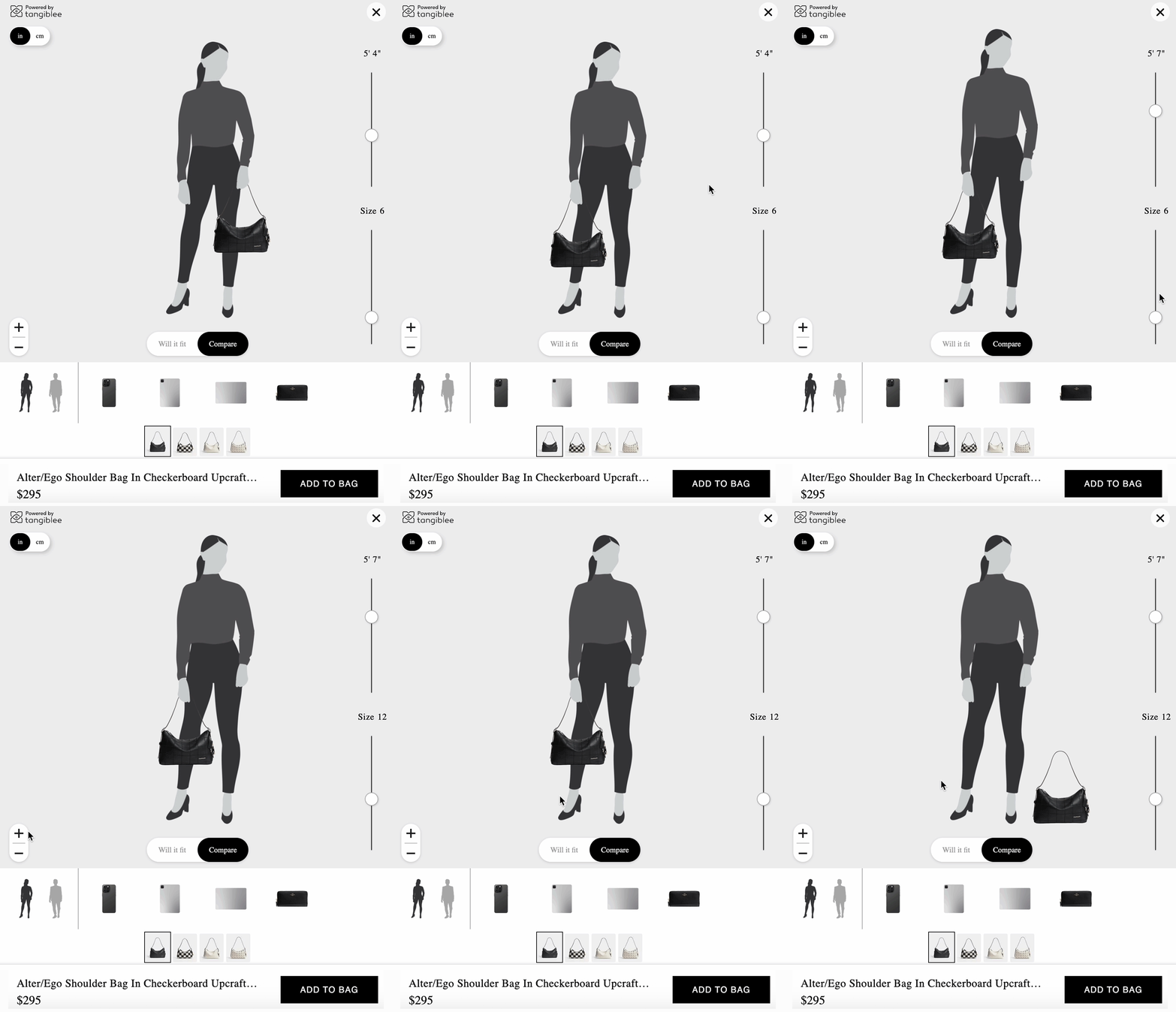
When shoppers feel seen and understood, confidence soars—and so do conversions. Tangiblee has a gallery of silhouettes, and we style the feature according to your brand image.
3. What Fits Inside (WFI) — Real-Life Capacity Previews
Say goodbye to abstract measurements. WFI shows everyday items—water bottle, charger, book — packed inside a realistic bag image. Shoppers instantly grasp capacity without parsing numbers.
There are no abstract measurements. It's just relatable context.
Perfect for:
- Work bags
- Travel bags
- Everyday totes

You can even tailor each WFI graphic to your audience — swap in gym gear for workout totes or makeup kits for weekend purses. These visuals also serve as social media content, driving traffic back to your product detail pages. We know the end users - your customers would appreciate you cared about the way they understand the real capacity of the bag.
The result? A +17.21% boost in add-to-cart rate compared to the previous version of WFI, fewer surprises at unboxing, and a smoother path from click to purchase.
4. WFI Premium — Interactive, Shoppable Packing
WFI Premium takes the WFI experience further, letting shoppers:
- Add purchasable items into the bag
- Use Magic Fill to auto-pack with daily-use items
- Add both the bag and the packed items to the cart
This engaging “design your day” experience uncovers cross-sell opportunities: customers discover items they didn’t know they needed. On the analytics side, you gain insight into what shoppers pack most—powerful data for merchandising and marketing.

Brands using WFI Premium report an 11.07% increase in add-to-cart and a measurable rise in average order value, all while trimming product-related returns.
5. Airline Carry-On Limits — Flight-Ready Verification
Airline Carry-On Limits lets shoppers quickly check if a carry-on bag meets size regulations for hundreds of airlines worldwide.
They can:
- Search their airline
- View approved size limits (in both inches and cm)
- See if the bag is Within Size Limits, Exceeds Limits, or Likely Within Size Limits
- Click through to the official airline policy for full transparency
Bonus: You can add a buffer (in mm or inches) to accommodate measurement variability.
Why it matters:
- Increases trust
- Reduces returns from non-compliant bags
- Empowers shoppers to travel confidently

This transparency builds trust, cuts post-trip gate checks, and delivers peace of mind—so travelers buy once and keep their new carry-on in hand, not back at the airport.
Business Benefits: Why Retailers Choose Tangiblee
- Lower Return Rates: Eliminate expectation gaps that drive 25% return rates on tech and travel bags.
- Higher Conversions: Engage shoppers with interactive, confidence-building tools.
- Increased AOV: WFI Premium boosts average order values with shoppable packing.
- Better UX & Accessibility: Inclusive sizing previews for every body type and device.
- Zero Extra Photography: All tools run on data and your imagery — no costly new shoots required.
Ready to Sell Smarter?
Tangiblee's interactive sizing tools answer the questions your shoppers are already asking:
- Will my laptop fit?
- What fits inside?
- Will this bag suit my body?
- Will this qualify as a carry-on?
When you provide those answers on your PDPs, you turn browsers into confident buyers — and first-time customers into repeat ones.
Equip your online store with Tangiblee sizing tools, and watch shoppers buy smarter, travel confidently, and return far less.
Tangiblee
We know what is essential.