
Find answers about implementation, virtual try-on, product visualization, integrations, analytics, and account support.
Configuration Analytics GTM - Configuration du compte GA - GA4
1. Attribuer l'adresse e-mail avec le rôle Lecteur
Attribuez le rôle Lecteur pour la propriété GA vers laquelle Tangiblee enverra toutes les données analytiques, à l'adresse e-mail suivante :
1.1. Partagez l'ID de propriété (ex. : 306418501) de la propriété GA partagée avec l'équipe Tangiblee.
1.2. Partagez l'ID de mesure (ex. : G-JQYB8ZRNS5) du flux Web présent dans la propriété GA.
1.3. Si Tangiblee gère votre test A/B, veuillez attribuer le rôle Éditeur à analytics2@tangiblee.com.
2. Créer les dimensions personnalisées suivantes
Créez les dimensions personnalisées suivantes dans la propriété GA partagée avec l'équipe Tangiblee (voir les tableaux ci-dessous) :
2.1. Dimensions personnalisées :
2.2 Métriques personnalisées :
Configuration du tag GTM
Il existe trois types d'événements Tangiblee :
- impression - dès que le CTA Tangiblee apparaît
- interaction - dès que le CTA Tangiblee est cliqué ou touché
- ping - toutes les 5 secondes tant que Tangiblee est ouvert
Pour activer les événements dataLayer de Tangiblee sur la plateforme GTM, vous devez créer des variables dataLayer, un déclencheur (trigger) et un tag.
Configuration des variables DataLayer
Pour chaque dimension personnalisée indiquée ci-dessus, configurez une variable dataLayer.
Par exemple :
.png)
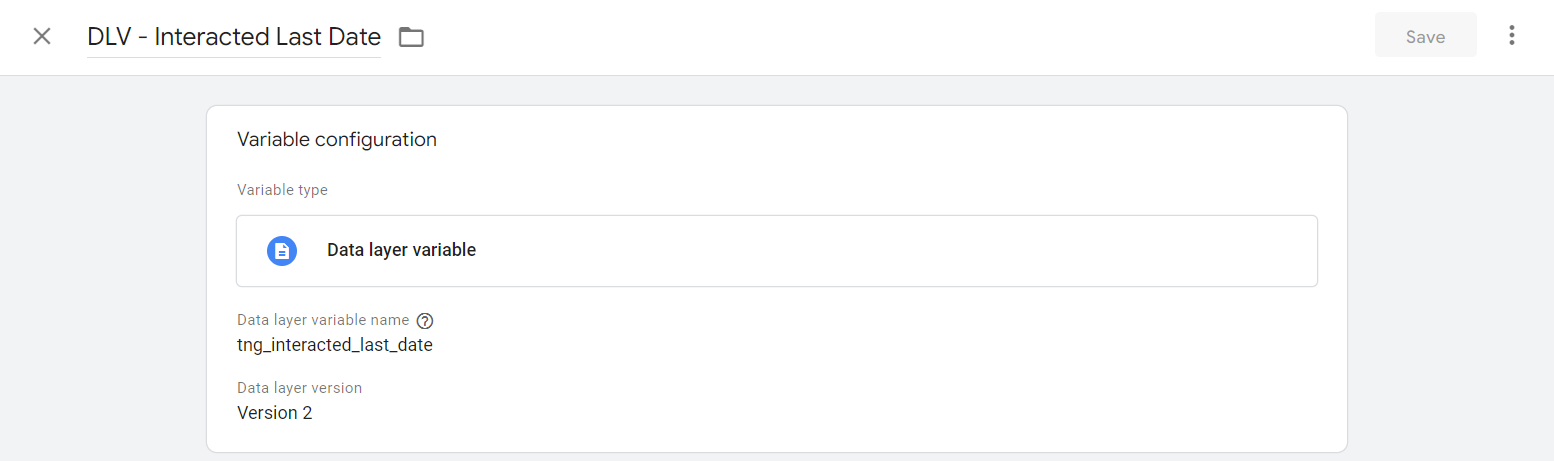
.png)
.png)
.png)
.png)
.png)
Configuration du déclencheur
Pour chaque événement indiqué dans ce document, nous devons configurer un déclencheur.
Par exemple :
.png)
.png)
.png)
Tags
Ensuite, créez un tag pour chaque déclencheur qui contienne toutes les dimensions personnalisées requises, ainsi qu'une liaison vers le déclencheur lui-même.
Par exemple :
.png)
.png)
.png)
dataLayer GA4, analytics GTM, dimensions personnalisées, mappage d'événements, configuration du gestionnaire de balises, implémentation du suivi
Configurez le suivi d’événements GA4 de Tangiblee via Google Tag Manager. Configuration des variables dataLayer, règles de déclencheur GTM et étapes de publication de tags pour les implémentations GTM.